
PHP2Shell: your Synology NAS may be at risk too
Reading time approx. 7 minutes
On 21 October 2026 the PHP project released emergency updates for two critical security flaws, together known as PHP2Shell (CVE-2026-109618 and CVE-2026-109619). They let an attacker run their own code on a web server remotely, without logging in first.
Both flaws are rated critical, the highest severity category there is. The technical details leaked before the updates were ready, and security firms are already reporting the first attacks.
What is PHP, and why should you care?
PHP is the programming language behind a large part of the internet: websites, online shops, customer portals and internal web applications. It can also run on a Synology NAS, through the Web Station package. If you host a website, an intranet or a web application on your NAS, you're almost certainly using PHP.
Is your Synology affected?
The risk lies with NAS devices where PHP handles web requests. That mostly happens through Web Station, the package you use to host a website or web application on your NAS. Ask yourself these questions:
- 1Is Web Station installed in Package Center?
- 2Does a website, WordPress or another web application run on the NAS?
- 3Can that website or the NAS be reached from the internet, for example through an open port or your own domain name?
- 4Which PHP packages are listed under Installed in Package Center, and why?
If you answer yes to the first two questions, your NAS is vulnerable. If the answer to the third is also yes, the risk is acute. Don't know the answer to question four? Have it checked.
Do you use Hyper Backup? Then make sure you read the next part.
What about Hyper Backup?
While preparing this article, we came across something most NAS owners don't know. Hyper Backup, the backup software that runs on almost every business Synology, needs PHP 7.4. Try to remove that package and you're told Hyper Backup will be removed with it.
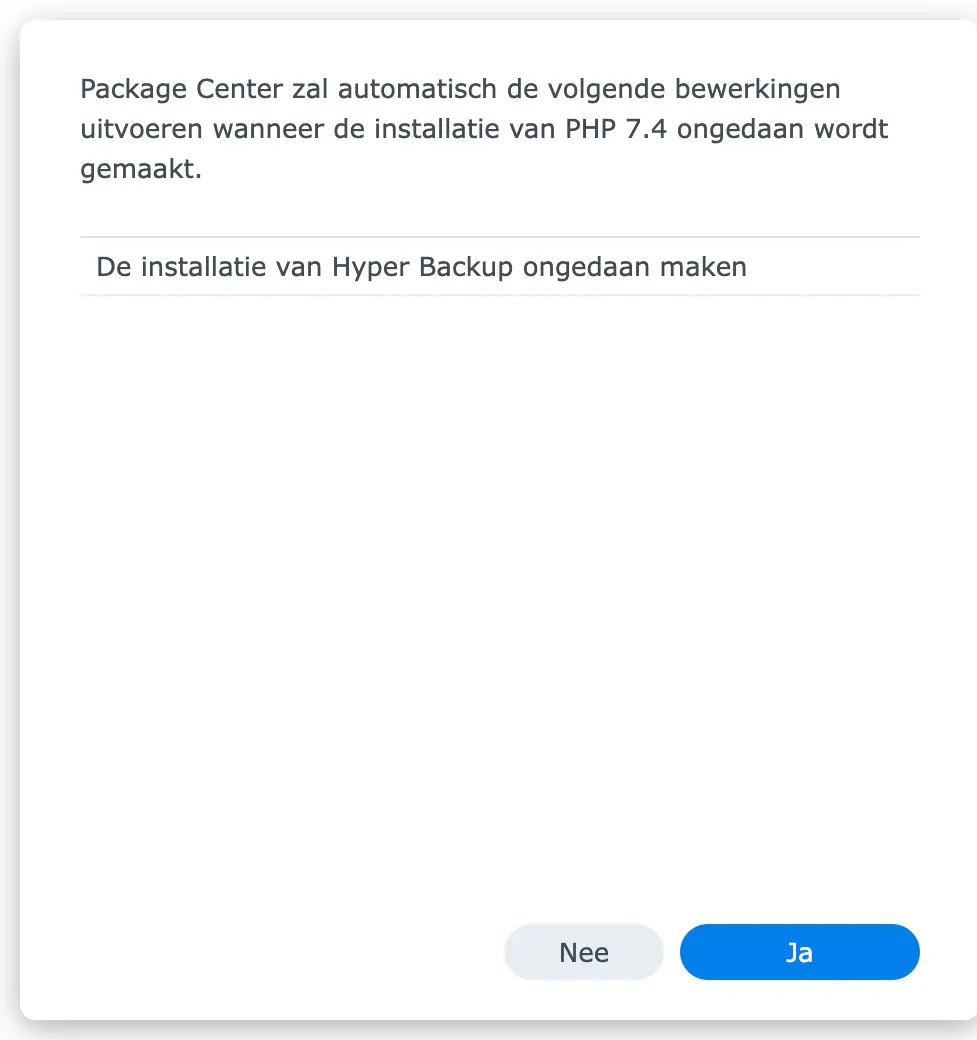
That raises an obvious question: is your backup now open to attackers? We got to the bottom of it on a test device of our own.
The answer is no. Hyper Backup uses PHP for one thing only: the connection to Amazon S3, a widely used cloud storage service. For that, the NAS runs a small program locally. That program doesn't receive visitors from the internet and doesn't handle web requests. And that is exactly where the PHP2Shell flaw lies: in the way PHP handles web requests. No web request, no attack.
Even so, this calls for vigilance. Hyper Backup runs on PHP 7.4, and that version is end of life: the PHP project hasn't released security updates for it since November 2022. New flaws in PHP 7.4 are therefore no longer fixed as a matter of course. Hyper Backup not being vulnerable to PHP2Shell today doesn't mean the same will hold for every future flaw.
Synology has announced that it will end support for these old PHP versions and update its packages. Until that happens, many NAS devices have outdated software at the heart of their backup. No reason to panic, but a good reason to keep a close eye on it.
What does this mean for you?
- ✓Don't remove PHP 7.4. Doing so switches off Hyper Backup, and with it your backups. That's a far bigger risk than the problem you're trying to solve.
- ✓Keep DSM and Hyper Backup up to date. As soon as Synology releases a version that uses a newer PHP, you'll get it straight away.
- ✓Keep track of new PHP security alerts. A future flaw could find a route that PHP2Shell didn't have. If you know PHP 7.4 is on the NAS, you can quickly judge whether action is needed.
- ✓Never use PHP 7.4 for a website. If a website does run on your NAS, choose a recent PHP version in Web Station.
Why waiting for Synology isn't an option
Synology ships its own PHP packages through Package Center, and they lag behind. At the time of writing, the newest PHP 8.4 that Synology offers is version 8.4.19. The flaw is only fixed from version 8.4.27. There is no updated PHP package yet, and at the time of writing (22 October 2026) Synology hasn't published a security advisory on PHP2Shell either. How long Synology will take to update is unknown. Until then, you need to take measures yourself.
Is a website running on your NAS? Here's what you can do today
If a website, WordPress or another web application runs on your NAS, PHP handles the requests from its visitors. That is exactly where the flaw lies. Take these three steps today. On a Synology, websites run through Web Station, and that's also where you set how PHP behaves.
No website on your NAS? Then there's nothing you need to change right now. Do leave the PHP packages in place, though, and keep an eye on Package Center.
Step 1: switch off the vulnerable feature for your website
The screenshots show DSM in Dutch; the menu names below are the English ones.
- 1
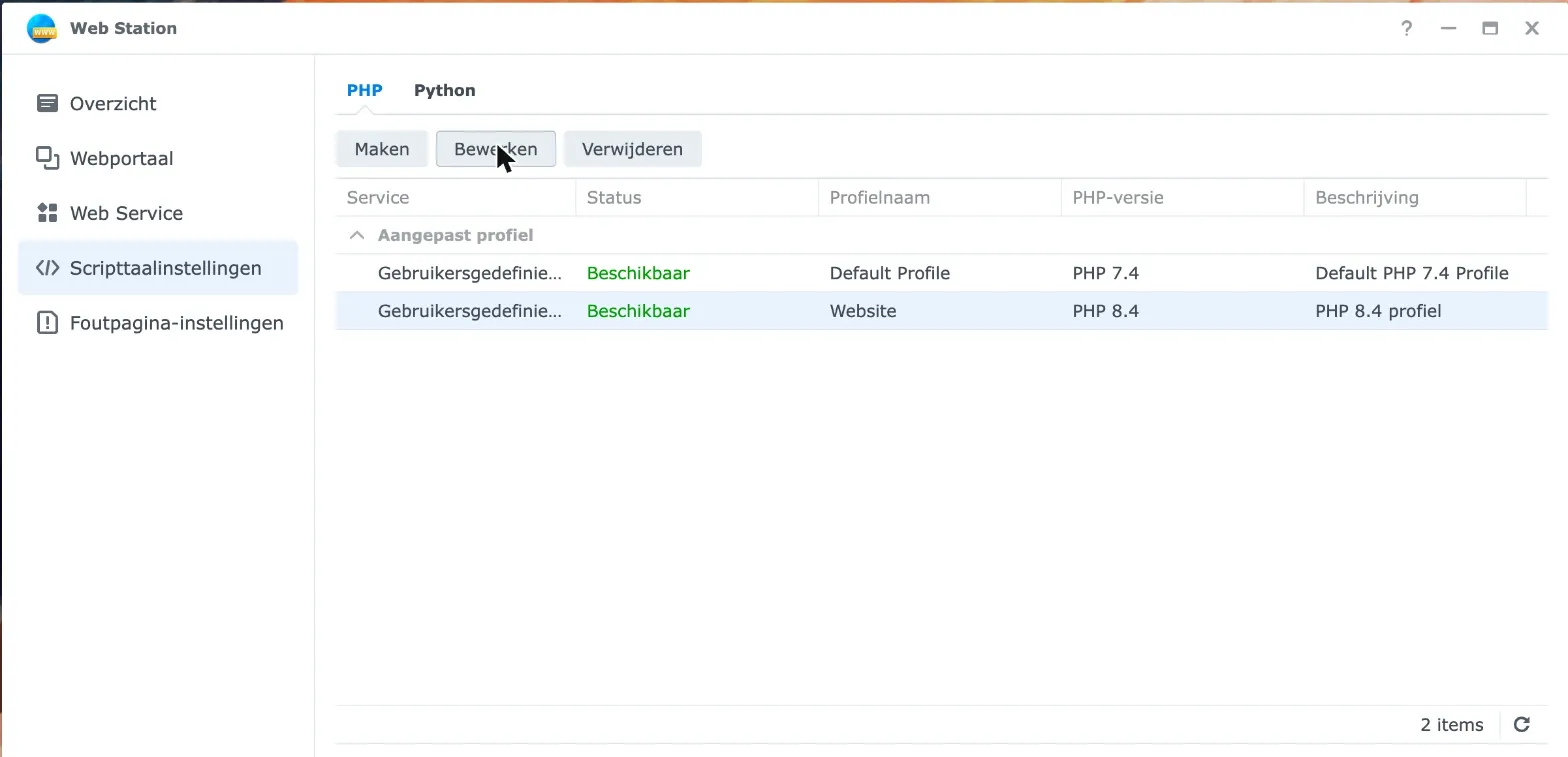
Open Web Station and choose Script Language Settings on the left.
- 2
Select your PHP profile and click Edit.
- 3
Open the Core tab and type
session.upload_progressin the filter field. Changesession.upload_progress.enabledfrom 1 to 0.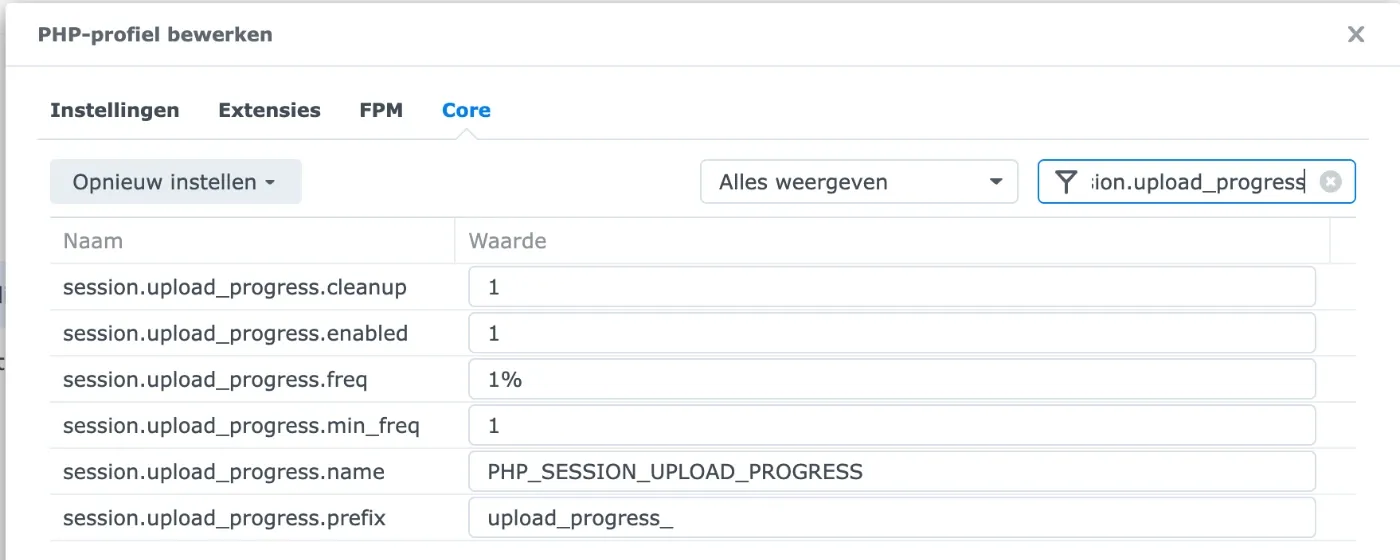
Before: set to 1 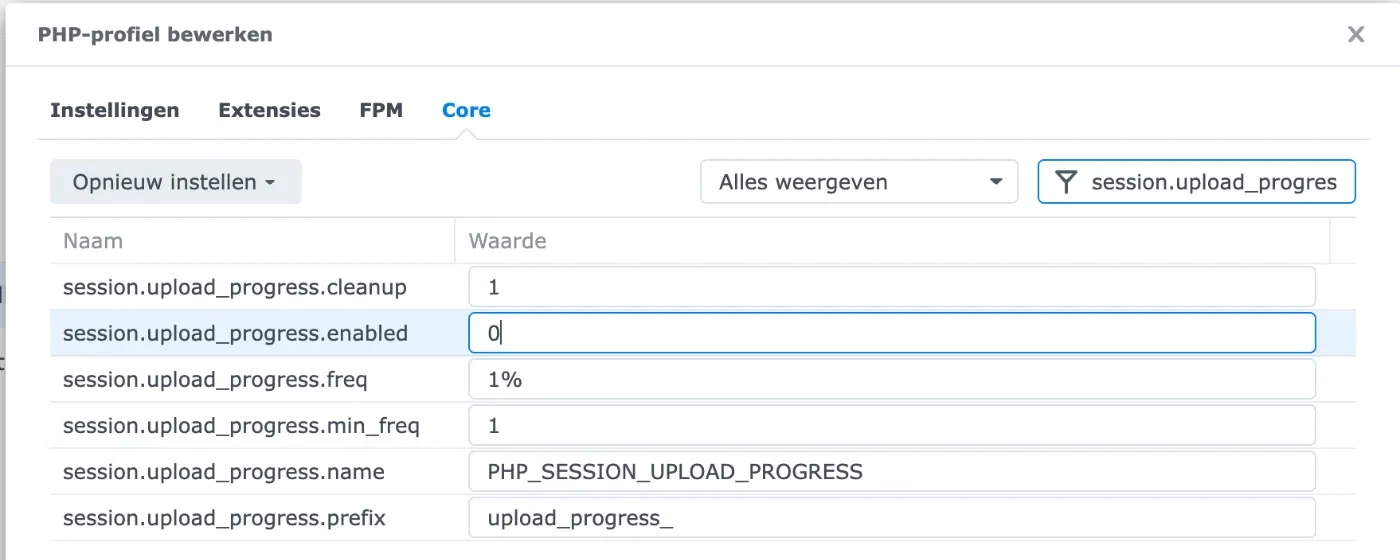
After: set to 0 - 4
Type
session.usein the filter field. Setsession.use_only_cookiesandsession.use_strict_modeto 1. Also check thatsession.use_cookiesis set to 1; it usually is already.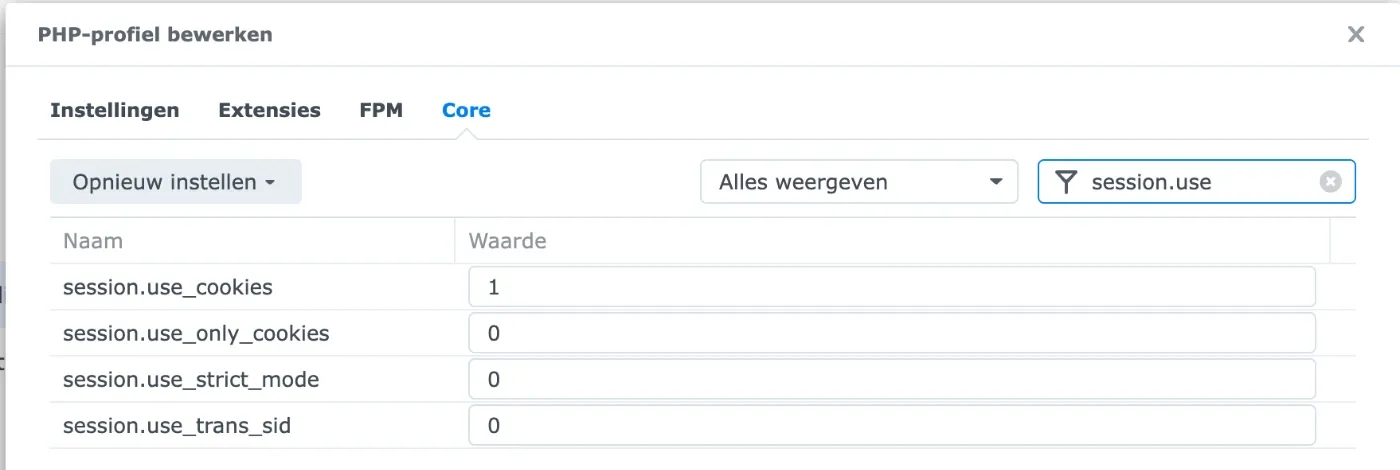
Before: set to 0 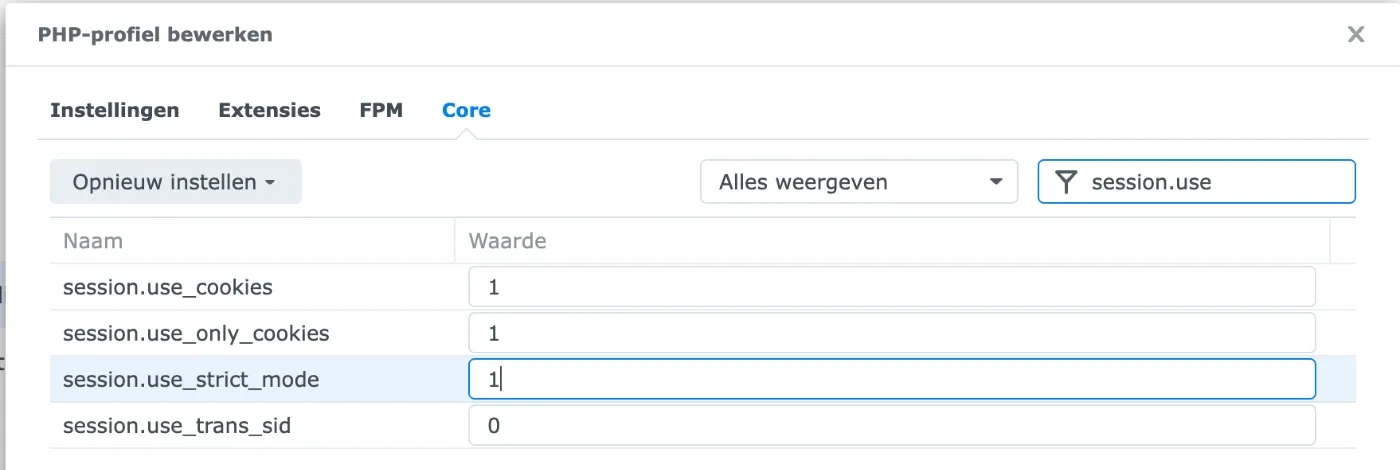
After: set to 1 - 5
Click Save. Then open the profile again and check that every value was kept.
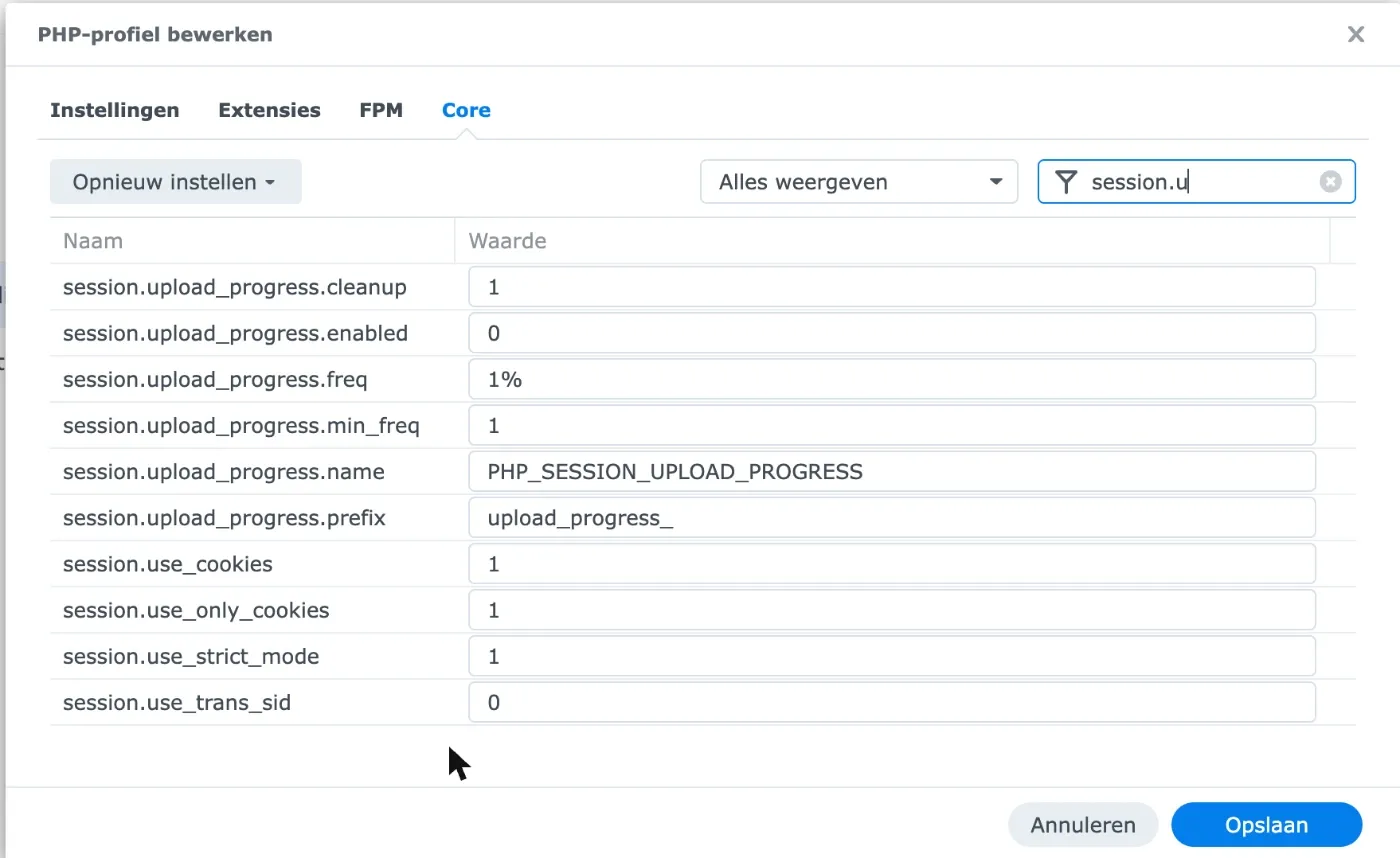
The end result. - 6
Go to Web Service, select your website and click Edit. Check that Profile shows the profile you just changed.
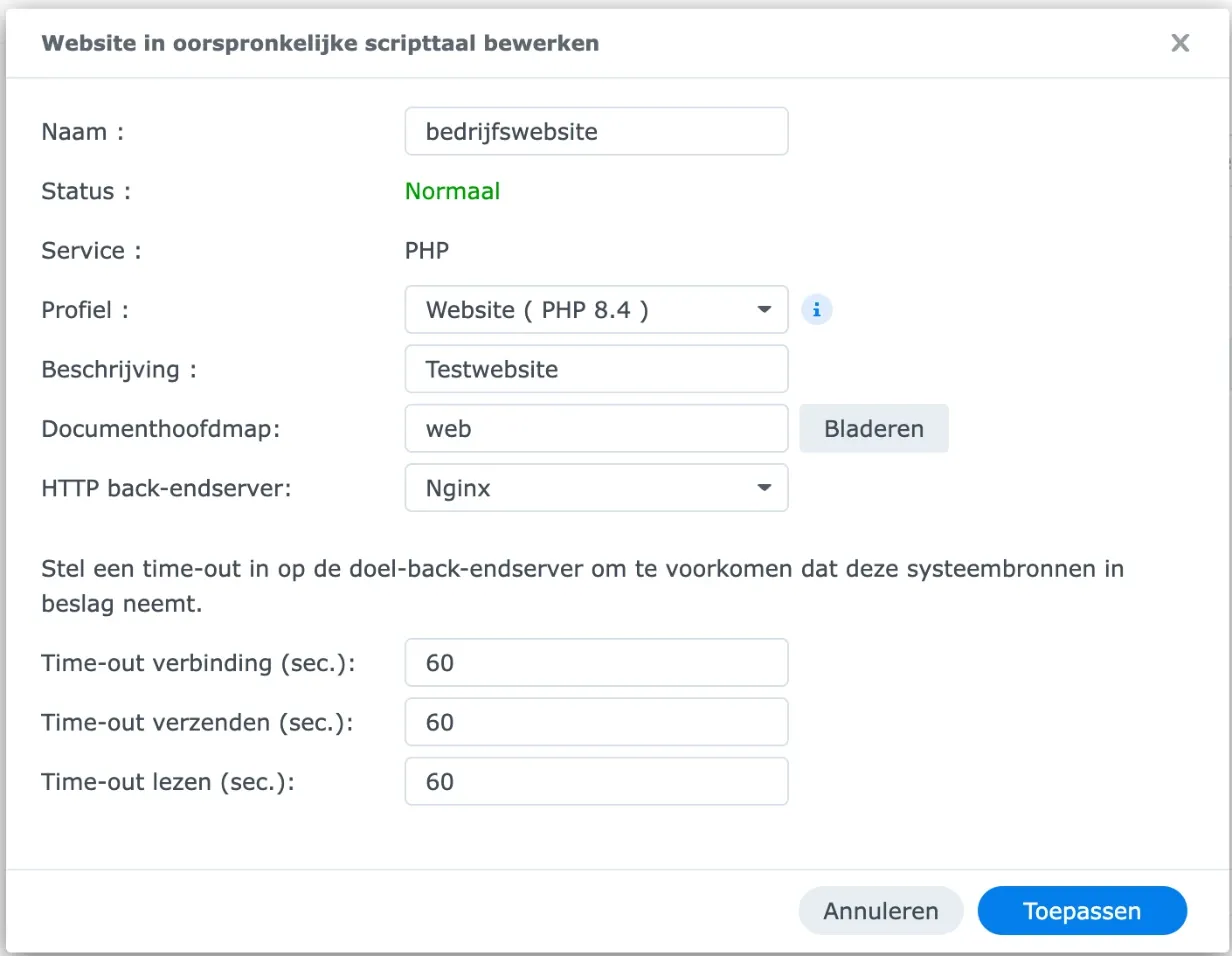
Have more than one PHP profile? Change them all.
Important: this is a stopgap, not a fix
According to the PHP security team, this change blocks the best-known attack route, but not every variant. Only an update closes the flaw completely. The settings from point 4 are good security practice; leave them as they are after the update too.
Step 2: limit what can be reached from the internet
Does your website not strictly need to be online? Take it off the internet until the update is available. No longer use Web Station at all? Then remove the package completely. What isn't running can't be attacked.
But don't remove PHP packages without thinking. A package that looks unnecessary may be needed for something important, such as Hyper Backup. Remove it blindly and you switch off your backups, swapping one risk for a bigger one.
Step 3: install the update as soon as it's available
Keep an eye on Package Center. As soon as Synology releases a PHP package with version 8.2.35, 8.3.36, 8.4.27 or later, install it straight away. Is your website still on PHP 8.1 or older? Those versions no longer get updates, so it's high time to move to a recent version.
The bigger picture: forgotten packages
A NAS is often the heart of an office. All the files, the backups and sometimes the website live on it. And that's exactly where risk quietly creeps in. A package once installed "just to try it out" can sit there for years. And as Hyper Backup shows, packages sometimes install components of their own that nobody gives a second thought.
How we handle this at nxtbit
When PHP2Shell became public, we checked for all our clients whether a PHP web server runs on their NAS. Where it did, we secured it straight away, without our clients having to do anything themselves. As soon as Synology releases updated PHP packages, we'll install them.
We also went beyond the news report. When it turned out Hyper Backup uses PHP 7.4, we investigated on a test device of our own whether that poses a risk. Even when the answer is reassuring, we want to be sure.
That isn't an exception: it's exactly what managed services are for. We actively follow security alerts, we know which devices and applications run at our clients, and we step in before a flaw becomes a problem. So as a business owner, you don't have to follow the news about every new security flaw yourself.
Are you sure your systems are secure?
Do you run a Synology NAS, a website or another application and aren't quite sure how it's secured? Book an introductory call with nxtbit. Together we'll look at where your risks are and what it takes to cover them.
Sources
- Help Net Security, PHP2Shell: Critical PHP vulnerabilities patched, update now!, 21 October 2026.
- Datadog Security Labs, PHP2Shell: critical vulnerabilities in PHP, accessed 22 October 2026.
- Synology, End of PHP 7.3 / 7.4 / 8.0 support, accessed 22 October 2026.
- PHP, Unsupported branches, accessed 22 October 2026.
- Synology, Security Advisory, accessed 22 October 2026: no advisory on PHP2Shell.